Pixels to Inches / CM Converter
A simple DPI converter: find the physical size of a pixel dimension, or work out the pixel dimensions for a measurement in inches or centimetres. For an exact target print size with a required pixel count, use the Print Size & Required Pixels Calculator.
How to use
- Choose the direction of the conversion.
- Enter pixels, or a length with its unit.
- Set the DPI/PPI of the image and press Convert.
How it works
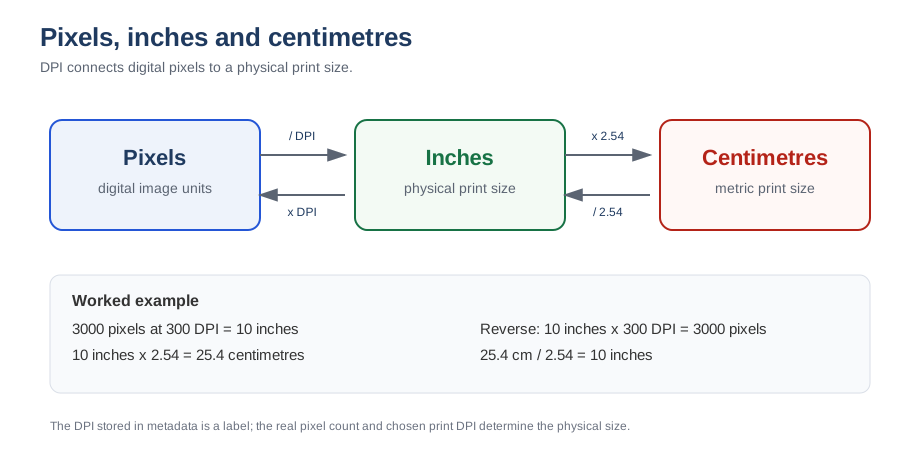
One inch contains DPI pixels, so inches = pixels ÷ DPI. Conversely pixels = inches × DPI. To convert from centimetres, first divide by 2.54 to get inches.
| Unit | Equals |
|---|---|
| 1 inch | 2.54 cm |
| 1 cm | 0.3937 inches |
| 1 px at 300 DPI | 0.00333 inches (0.0847 mm) |
When to use this calculator
- You know an image's pixel dimensions and want to know the physical print size.
- A print service gives a size in inches or centimetres and you need the pixel dimensions.
- You are preparing a file for a frame, canvas or photo book with fixed dimensions.
- You want to compare a phone photo with the requirements of a specific product.
Worked examples
- 1200 × 800 px at 300 DPI prints at 4 × 2.67 inches (10.16 × 6.77 cm) - a standard 4 × 6 photo with a different ratio.
- 3000 px at 150 DPI prints at 20 inches; the same file at 300 DPI prints at 10 inches.
- A 10-inch print at 300 DPI requires 3000 px; at 150 DPI it requires only 1500 px.
- 210 mm (A4 width) at 300 DPI requires 2480 px.
DPI, PPI and the metadata trap
When people say "DPI" for an image file, they mean pixels per inch. The number stored in the file's metadata does not change how many pixels exist - a 3000 px image is always 3000 px, whether the tag says 72 or 300 DPI. What changes is the physical size at which those pixels are printed. This converter always uses the actual pixel count and the DPI you choose.
Common mistakes
- Changing the DPI field in software and believing the file now has more detail.
- Using 72 DPI because that is what the camera tag says, then ordering a tiny print by mistake.
- Mixing up width and height when a product is portrait rather than landscape.
- Forgetting that different print products need different DPI - canvas rarely needs 300, business cards almost always do.
Related tools
Print size calculator · How big can I print? · Print PPI calculator
Frequently asked questions
How many inches is 1200 pixels at 300 DPI?
1200 ÷ 300 = 4 inches (10.16 cm). An 1200 × 800 image prints at 4 × 2.67 inches at 300 DPI.
Is DPI the same as PPI?
DPI describes printer dots; PPI describes pixels in an image. For sizing digital images for print they are treated as the same value in most workflows.
How many pixels are in an inch?
It depends on the resolution: 300 DPI means 300 pixels per inch, 150 DPI means 150 pixels per inch.