Print Size & Required Pixels Calculator
This calculator is for an exact target: convert pixels to a physical print size, or find the required pixel dimensions for a specific size. If you want the maximum size at several DPI levels, use How Big Can I Print?
How to use this tool
- Choose whether you are converting pixels to print size or print size to pixels.
- Enter the two dimensions and the DPI your printer or print service expects.
- Press Calculate to see the result in inches and centimetres.
How it works
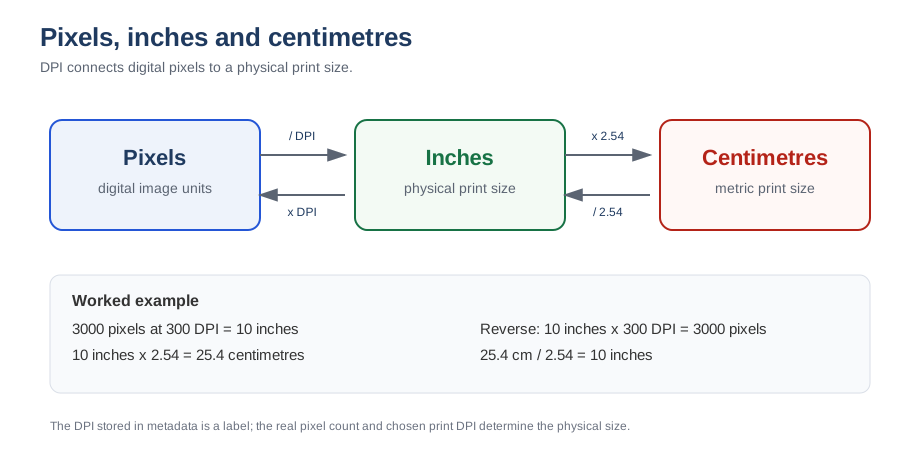
Print size is pixel dimension divided by DPI: size (inches) = pixels ÷ DPI. To go the other way, multiply the physical size by the DPI: pixels = inches × DPI. One inch equals 2.54 centimetres.
Common DPI guidelines
| Use case | Typical DPI / PPI |
|---|---|
| Screen and web graphics | 72–96 |
| Large format posters viewed from a distance | 100–150 |
| Photo-quality prints and brochures | 300 |
When to use this calculator
- You have a photo or artwork and need to know how large it will print before ordering.
- A print service asks for a minimum pixel size and you want to check whether your file qualifies.
- You are preparing a file for a specific product such as an 8 × 10 print, a 16 × 20 canvas or a poster.
- You want to compare the same image at 150, 200 and 300 DPI before deciding on a product.
Worked examples
- 3000 × 2000 px at 300 DPI prints at 10 × 6.67 inches (25.4 × 16.9 cm) - a standard 6 × 9 or 4 × 6 print has room to spare.
- 6000 × 4000 px at 300 DPI prints at 20 × 13.3 inches; the same file at 150 DPI prints at 40 × 26.7 inches, which suits a large poster viewed from a few feet away.
- Target 16 × 20 inches at 300 DPI requires 4800 × 6000 pixels (28.8 MP); at 200 DPI it requires 3200 × 4000 pixels (12.8 MP).
Choosing the right DPI
Use 300 DPI for anything read or held up close: photo prints, business cards, brochures and documents. Use 200 DPI for canvas prints, 150 DPI for posters and trade-show graphics, and 100–150 DPI for large-format pieces viewed from several feet away. The further away people stand, the fewer pixels per inch you need - see the poster DPI calculator for a distance-based recommendation.
Common mistakes
- Confusing the DPI tag with resolution. A 6000 × 4000 px file tagged 72 DPI is still a high-resolution file; only the pixel count matters for print size.
- Stretching the aspect ratio. If the image ratio does not match the product, crop it instead of forcing the dimensions, or use the crop calculator.
- Upscaling to hit a number. Adding pixels in software does not add real detail; it only makes the file larger.
- Ignoring bleed. Commercial print products need extra artwork beyond the trim edge - check the bleed calculator.
Related tools
How big can I print? · Print PPI calculator · Pixels to inches converter · What is 300 DPI?
Frequently asked questions
What size will a 3000 x 2000 pixel image print at 300 DPI?
Divide each side by 300: 3000 ÷ 300 = 10 inches and 2000 ÷ 300 = 6.67 inches. The printed size is 10 × 6.67 inches (25.4 × 16.9 cm).
What is the difference between DPI and PPI?
DPI (dots per inch) is a printer output measurement; PPI (pixels per inch) describes the pixel density of a digital image. For sizing images for print, the two are used interchangeably in practice.
Can I print a low-resolution image bigger by lowering the DPI?
Mathematically yes, but the print will look soft or pixelated because there are fewer pixels per inch. Choose the resolution recommended by your print service, then check whether your image has enough pixels.