Poster DPI Calculator
Work out how many pixels your poster needs based on its physical size and how far away people will view it. Large posters viewed from a distance need fewer pixels per inch than small prints held close.
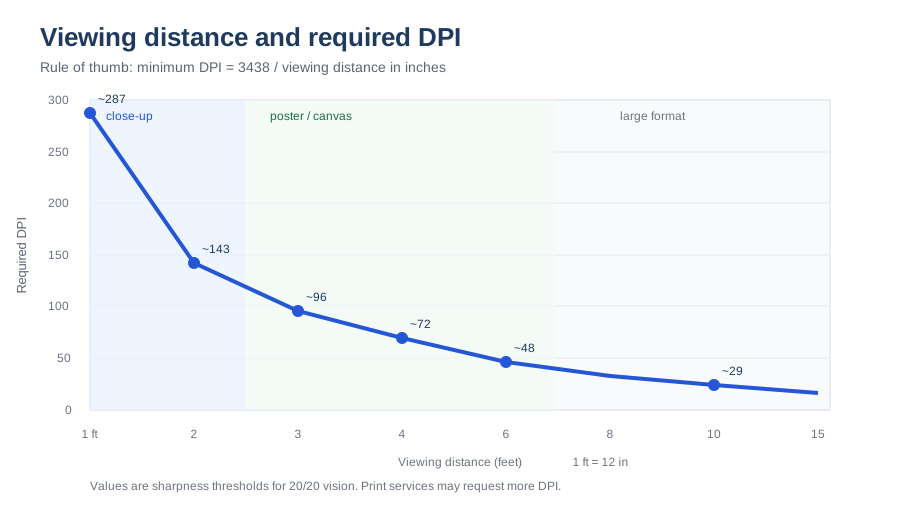
Recommended DPI by viewing distance
| Viewing distance | Minimum DPI for a sharp look | Typical pixel height for 24 × 36 in |
|---|
How the calculation works
The minimum DPI for an image to look sharp to 20/20 vision is roughly 3438 ÷ viewing distance in inches. At 5 feet (60 inches) that gives about 57 DPI; at 3 feet it gives about 96 DPI. In practice print services usually prefer round values such as 100 or 150 DPI, so the tool also shows a recommended value.
When to use this calculator
- Ordering a poster, banner or wall graphic and unsure what resolution to supply.
- Checking whether an existing photo has enough pixels for a large format print.
- Deciding between 100, 150 and 300 DPI based on where the print will hang.
- Estimating the file size and pixel dimensions a print service will request.
Worked examples
- 24 × 36 in poster viewed from 5 ft: the sharpness threshold is about 57 DPI; a practical choice is 100–150 DPI, or 2400 × 3600 to 3600 × 5400 px.
- 3 × 2 m event backdrop viewed from 10 ft: about 30 DPI is the threshold; 75 DPI provides a comfortable margin, around 8858 × 5906 px.
- Printed menu read at arm's length (2 ft): the threshold is about 143 DPI, so use 150–300 DPI.
- Billboard viewed from 100 ft: only about 3 DPI is theoretically needed; real files are usually far higher, but 10–30 DPI is common practice.
Where the 3438 number comes from
The formula divides 3438 by the viewing distance in inches. It is derived from the eye's ability to resolve about one arc minute of detail, which corresponds to 20/20 vision. At 60 inches the result is 57 DPI: below that, a person with average vision could start to notice the pixel structure. Real-world printing adds a safety margin because paper texture, lighting and imperfect vision all vary.
What print services actually expect
- Posters and trade-show graphics: commonly 100–150 DPI.
- Large canvas and wall murals: 75–150 DPI depending on size and distance.
- Backdrops and stage graphics: 50–100 DPI.
- Small prints and hand-held items: 300 DPI.
If a service states a fixed requirement, follow it - their production line may assume one standard regardless of size.
Common mistakes
- Demanding 300 DPI for a billboard, which produces an enormous file nobody can see the detail of.
- Upscaling a small photo to hit a DPI number instead of accepting the natural size or choosing a smaller product.
- Using the viewing distance of the person who ordered the print rather than the audience who will see it.
Related tools
How big can I print? · Roll-up banner calculator · Large format resolution guide
Frequently asked questions
What DPI should a 24 × 36 poster be?
For a poster people stand a few feet from, 100–150 DPI is typical: 24 × 36 inches at 100 DPI means 2400 × 3600 pixels, and at 150 DPI it means 3600 × 5400 pixels.
Why do print shops still ask for 300 DPI for posters?
Some services use one standard for every product to keep quality consistent. If they ask for 300 DPI, supply it: a 24 × 36 poster at 300 DPI needs 7200 × 10800 pixels, which is a very large file.
Will a 150 DPI poster look pixelated?
Not at normal viewing distance. 150 DPI is comfortably above the sharpness threshold for distances beyond about 2 feet, and is a common large-format standard.