Large Format Print Resolution
Large prints are viewed from farther away, so they need fewer pixels per inch than small prints. The useful resolution depends on viewing distance: minimum DPI ≈ 3438 ÷ viewing distance in inches for an average 20/20 eye.
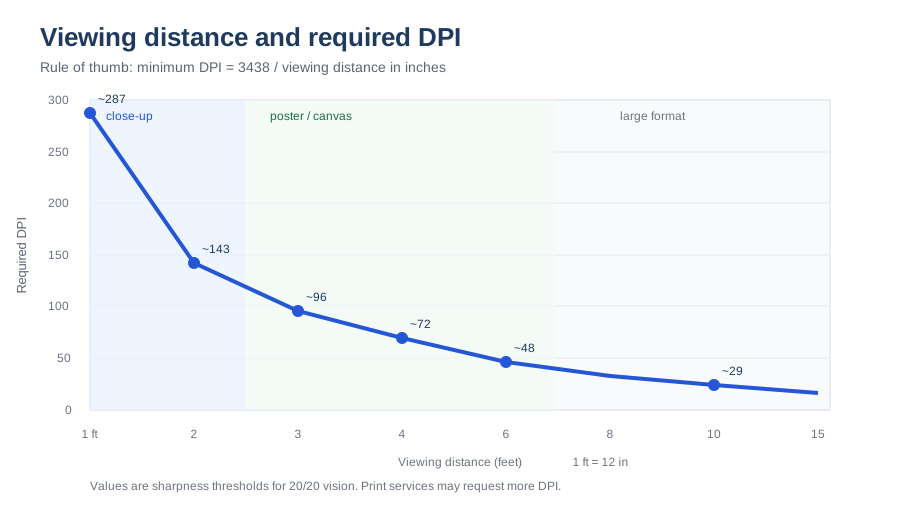
Suggested resolution by viewing distance
| Typical viewing distance | Suggested DPI | Example product |
|---|---|---|
| 1–2 ft | 150–300 | Trade-show graphics viewed up close |
| 3–6 ft | 75–150 | Posters, roll-up banners, wall graphics |
| 10–25 ft | 30–75 | Large wall posters, event backdrops |
| 50–100+ ft | 10–30 | Billboards and building wraps |
Worked examples
| Product | Print size | Suggested DPI | Pixel dimensions |
|---|---|---|---|
| Roll-up banner | 850 × 2000 mm | 150 | 5020 × 11811 px |
| Event backdrop | 3 × 2 m | 75 | 8858 × 5906 px |
| Billboard | 10 × 4 m | 20 | 7874 × 3150 px |
What to do when your image is too small
- Ask the print service for its exact DPI or pixel requirement.
- Keep vector text and logos as vectors where possible - they scale without quality loss.
- For photographic backgrounds, professional print shops can upscale moderately with specialised software; ask before doing it yourself.
- Never judge a large print by zooming into it on screen at 100% - evaluate at the intended viewing distance.
Frequently asked questions
Is 300 DPI required for billboards?
No. A billboard viewed from tens of metres only needs roughly 10–30 DPI. A 300-DPI file for a huge billboard would be impractically large and contains detail nobody can see.
Why does my print service still ask for a high DPI for large formats?
Some services standardise on one resolution for all files, or their software expects it. Follow their specification, and ask whether they can accept lower-DPI files for very large sizes.
Matching file size to production
Large-format printers use RIP software that can upscale files during processing, but the quality depends on the original detail. A practical approach is to meet the suggested DPI for the viewing distance and no more: a 3 × 2 m backdrop at 75 DPI is far more data than most workflows want, while a small interior poster at the same distance may need 150 DPI. Vector elements - text, logos, simple shapes - stay sharp at any size and should never be flattened into low-resolution pixels.
Choosing the right material
- Photo paper and poster paper: indoor displays, short-term use, best colour reproduction.
- Vinyl with laminate: outdoor banners, durable, resistant to rain and handling.
- Mesh: very large outdoor fences and scaffolding where wind must pass through.
- Canvas and textile: wall graphics and backdrops, softer look, easy to store.
Material choice affects how much detail is visible, so ask the printer whether their suggested DPI changes with the substrate.
What to send the print shop
- Ask for a specification sheet: size, DPI or pixel requirement, bleed, colour mode and file format.
- Request their template if the product has covered edges, grommets or a base mechanism.
- Supply vector text and logos, and keep the layout layered until the final export.
- For large or important jobs, approve a scaled-down proof before full production.
Related tools
Roll-up banner calculator · Poster DPI calculator · Print PPI calculator