Bleed and Safe Area Guide
Bleed is the extra area of artwork that extends beyond the final trimmed edge. This guide explains the concept with a diagram and worked examples, and links to free templates. If you only need to calculate one document size, use the Bleed Size Calculator.
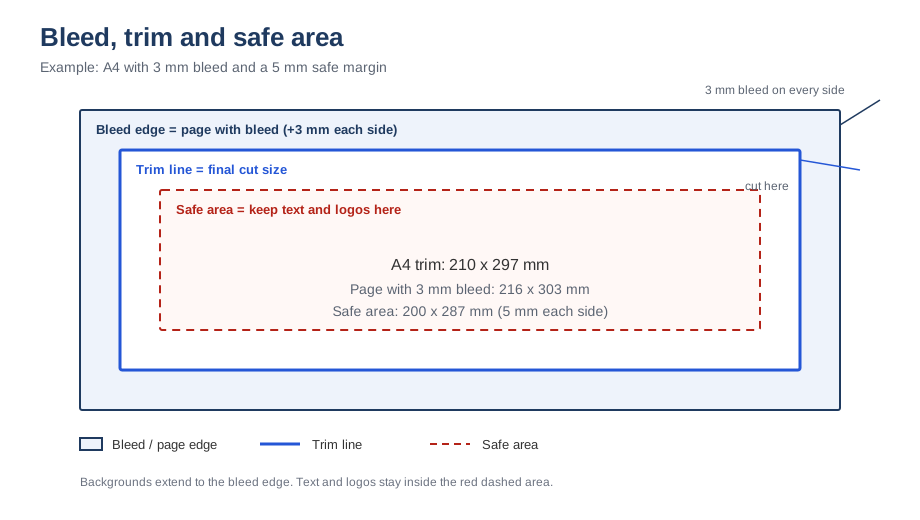
Free templates: download A4, US Letter and business-card bleed templates.
How much bleed do you need?
| Product | Typical bleed per side |
|---|---|
| US business cards, flyers, brochures | 0.125 in (1/8 in) |
| European print work | 3 mm |
| Large posters and banners | 0.25 in (6 mm) |
Always follow the template or specification from your print service - their cutting tolerance may differ.
Bleed vs safe margin
Bleed sits outside the final page edge and is trimmed away. The safe margin (live area) sits inside the final page edge and keeps text and logos away from the cut. A common safe margin is 0.125–0.25 in or 3–6 mm from the trim edge, and some services ask for at least 5% of the page size on each side.
How to set up a print-ready file
- Create the document at the final size plus bleed on all sides: for an 8.5 × 11 in flyer with 0.125 in bleed, make the canvas 8.75 × 11.25 in.
- Extend background colours, photos and artwork to the outer bleed edge.
- Keep text and logos inside the safe margin.
- Export with crop marks if your service provides a template with them.
Use the bleed calculator to work out exact document and safe-area sizes.
Frequently asked questions
Do I always need bleed?
Yes for any design with edge-to-edge colour or images. If the design has a white border on purpose, bleed may not be needed, but most commercial print services still recommend a small bleed.
What happens if I do not add bleed?
After trimming, a thin white line can appear on one or more edges whenever the cut shifts. The printer may also reject the file or ask for a corrected version.
A full bleed example
A US Letter flyer with a full-bleed photo background: the final trim size is 8.5 × 11 in. Add 0.125 in bleed on every side and the document becomes 8.75 × 11.25 in. The photo must cover the whole 8.75 × 11.25 in canvas, while the headline and logos stay inside a safe area measuring about 8.25 × 10.75 in. After trimming, the extra border disappears and the photo reaches the paper edge exactly.
Folded and double-sided items
Brochures and folded cards need bleed on the outer edges of the flat sheet, plus safe margins around every fold. Panels that meet at a fold do not need bleed along the fold line, but the artwork must align across it. For double-sided printing, add the same bleed and margins to both faces, and remember that a tiny misregistration between sides is normal - avoid designs where a front element must line up perfectly with the back.
Checking your exported PDF
- Open the PDF and confirm the page size equals trim size plus bleed.
- Zoom to the very edge: background colours and images should reach it with no white gaps.
- Use the PDF preflight or output preview to inspect the trim and bleed boxes if available.
- Compare against the printer's template rather than assuming your numbers are correct.
Related tools
Bleed calculator · Print file setup checklist · Business card size calculator
Free download: get the A4, Letter and business-card bleed templates.