Bleed Size Calculator
Work out the exact document size and safe area when a printer asks for bleed. This page is the quick calculator - for the concept, worked examples and free templates, see the Bleed and Safe Area Guide.
Common bleed standards
| Market / product | Typical bleed |
|---|---|
| US commercial print | 0.125 in (1/8 in) per side |
| European print | 3 mm per side |
| Large format / posters | 0.25 in (6 mm) per side |
What bleed and safe margins mean
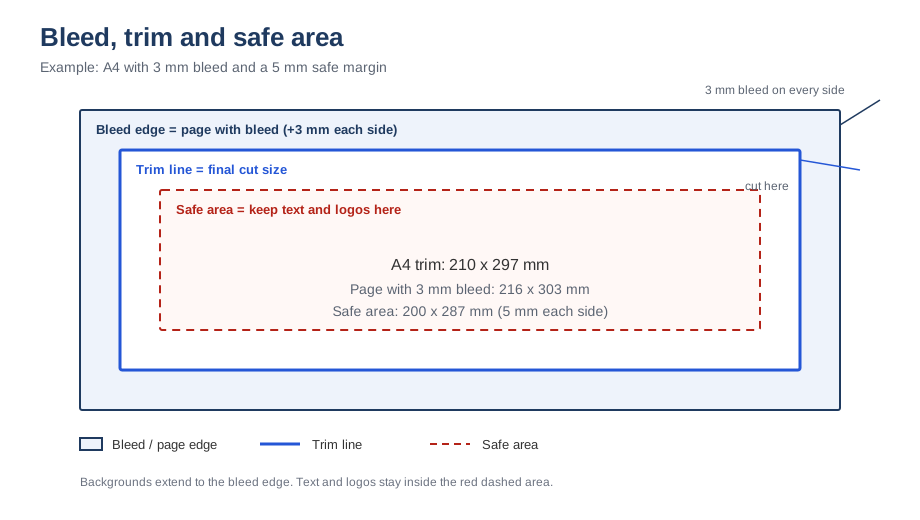
Bleed is extra artwork that extends beyond the final trim edge, so no white gap appears after cutting. The safe margin (also called the live area) is the inner zone where text and logos must stay so they are never trimmed or too close to the edge.
When to use this calculator
- Any design with colour, photos or artwork that reaches the edge of the page.
- Business cards, flyers, brochures, posters and packaging prepared for a commercial printer.
- Checking the document size before exporting, so the printer does not reject the file.
- Setting safe margins so text and logos are not clipped during trimming.
Worked examples
- US Letter flyer (8.5 × 11 in) with 0.125 in bleed: the document becomes 8.75 × 11.25 in.
- A4 flyer (210 × 297 mm) with 3 mm bleed: the document becomes 216 × 303 mm.
- 24 × 36 in poster with 0.25 in bleed: the document becomes 24.5 × 36.5 in.
- Business card 3.5 × 2 in with 0.125 in bleed: 3.75 × 2.25 in, or 1125 × 675 px at 300 DPI.
How to extend artwork into the bleed
- Create the document at trim size plus bleed on all four sides.
- Extend background colours and photos past the trim line to the outer edge.
- Do not stretch the subject; enlarge the background or use a mirrored edge if necessary.
- Keep text and logos inside the safe area, well away from the cut.
- Export with crop marks when the printer's template includes them.
Bleed is not a margin
Bleed lives outside the final page and gets cut off. Margins and safe areas live inside the final page and protect content. A common beginner mistake is adding 3 mm of "margin" and calling it bleed - the background still stops short of the edge, and a white sliver appears after trimming.
Common mistakes
- Adding bleed to the design but exporting without the extra area included.
- Forgetting one or two edges, which produces a white line on exactly those sides.
- Scaling the whole design after adding bleed instead of enlarging the background only.
- Assuming every printer uses the same bleed - always check their template.
Related tools
What is bleed in printing? · Print file setup checklist · Business card size calculator
Free download: A4, Letter and business-card bleed templates.
Frequently asked questions
What size file should I create for an 8.5 × 11 in flyer with 0.125 in bleed?
Add 0.125 in on every side: 8.75 × 11.25 in. Your background artwork must extend to that edge; text should stay inside the safe area (typically 0.5 in from the trim edge or the printer's stated margin).
Is bleed the same as margin?
No. Bleed extends outside the final page edge. Margins and safe areas are inside the final page and protect text and important content from being cut.